Wabba-Sego

Your microsegmentation governed, from the labelling model to enforcement

Your labelling model and your guardrails are the foundation of all the logic: Wabba-Sego checks, builds, simulates and applies every change from them, through configuration, with no custom development.

The philosophy

Your labelling model, the foundation of all the logic

  1. Your model

    Label types, tags, naming rules, catalogue, label groups, applications.

  2. Your conventions

    One ruleset per application and scope (by default: environment, location); rules written with labels.

  3. Your guardrails

    Forbidden combinations, allowed flow matrices, forbidden ports; exceptions with expiry dates.

  4. Plans

    Every write simulated on the live state, approved if you require it, applied in order and traced.

Every function builds on it

  • Flow check
  • Imports and entries
  • Impact and proposed rules
  • Remediation
  • Rule review
  • Label conformity
  • Compliance report

Configured, with no custom development: Wabba-Sego adapts to your labelling and your guardrails.

Govern

Your company rules, applied everywhere and proven

UNIQUE*

Your model, described once, applied everywhere

The model is described on screen, type by type; the platform derives the catalogue of allowed labels from it and refuses the rest.

  • Types and tags: built-in and custom types, plain or made of tags (ZONE and TIER for the role type).
  • Naming rules: prefix, separator, case, characters, length; the platform generates the names.
  • Forbidden combinations: these labels can never be created, not by import, entry or plan.
  • Label groups kept by the model: members chosen by tag or by name, corrected through a plan.
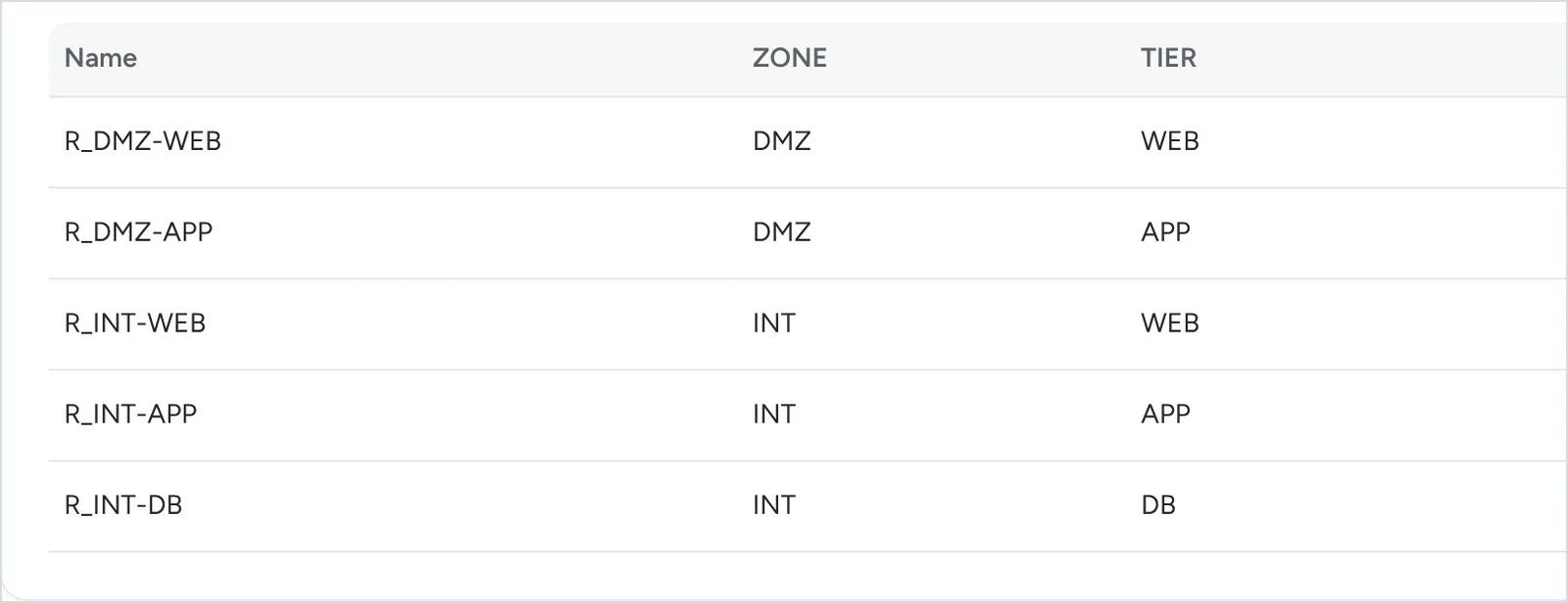
Allowed combinations of the role type: R_DMZ-WEB, R_DMZ-APP, R_INT-WEB, R_INT-APP, R_INT-DB
The generated catalogue, R_ZONE-TIER in capitals; DMZ + DB, a forbidden combination, is left out.

UNIQUE*

Guardrails that keep every rule compliant

Every rule must comply with all your allowed flow matrices, your forbidden ports and your model.

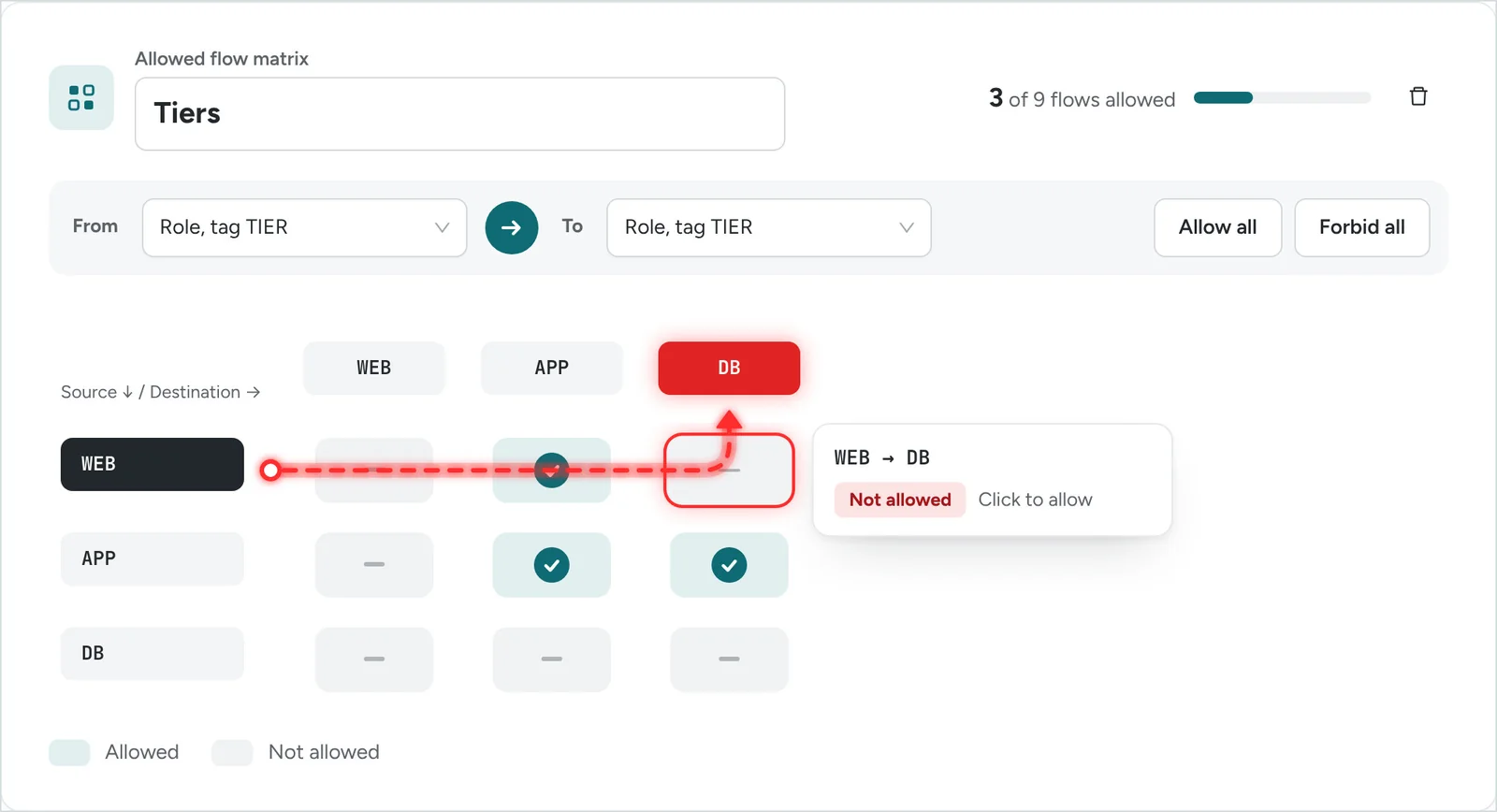
  • Allowed flow matrices on a label type (environments) or a tag (tiers).
  • Forbidden ports and protocols, each with its reason: a port, a range or a whole protocol, IP lists included.
  • Labels that comply with the model: a rule that uses a label outside the model is reported.
Tiers allowed flow matrix: WEB to DB not allowed
Tiers matrix, on the TIER tag: WEB → DB is refused.

Checked wherever a rule is created, waived by exception

Guardrails are not an after-the-fact report: they are checked at flow check, at import and entry, on proposed rules, at remediation, at the dry run on the PCE read again, and on existing rules.

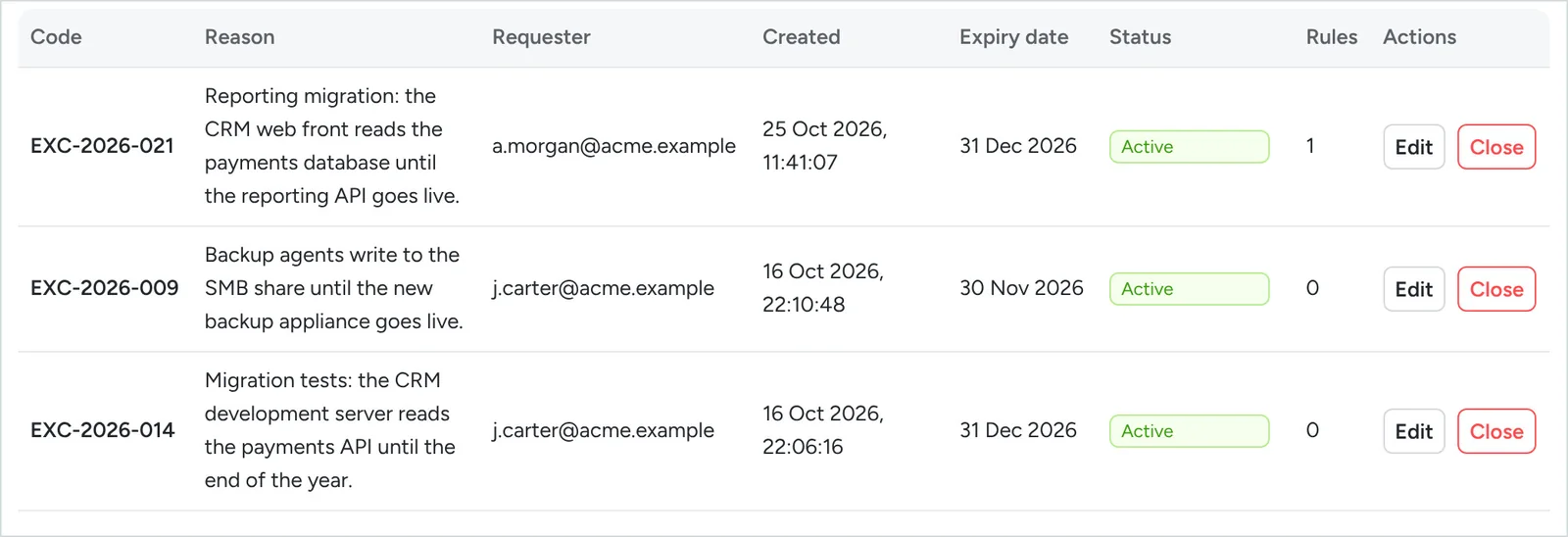
  • A non-compliant rule needs an exception: code, reason, expiry date.
  • The exception is visible to the approver and logged every time it is used.
  • When it expires, its rules must be recertified.
Exceptions register, with their rules
The exceptions register: a WEB → DB rule is applied only with an active exception.

A compliance report ready for audit

One PDF per instance, on demand: labels, fleet and enforcement, rule review, recertification, exceptions and guardrails.

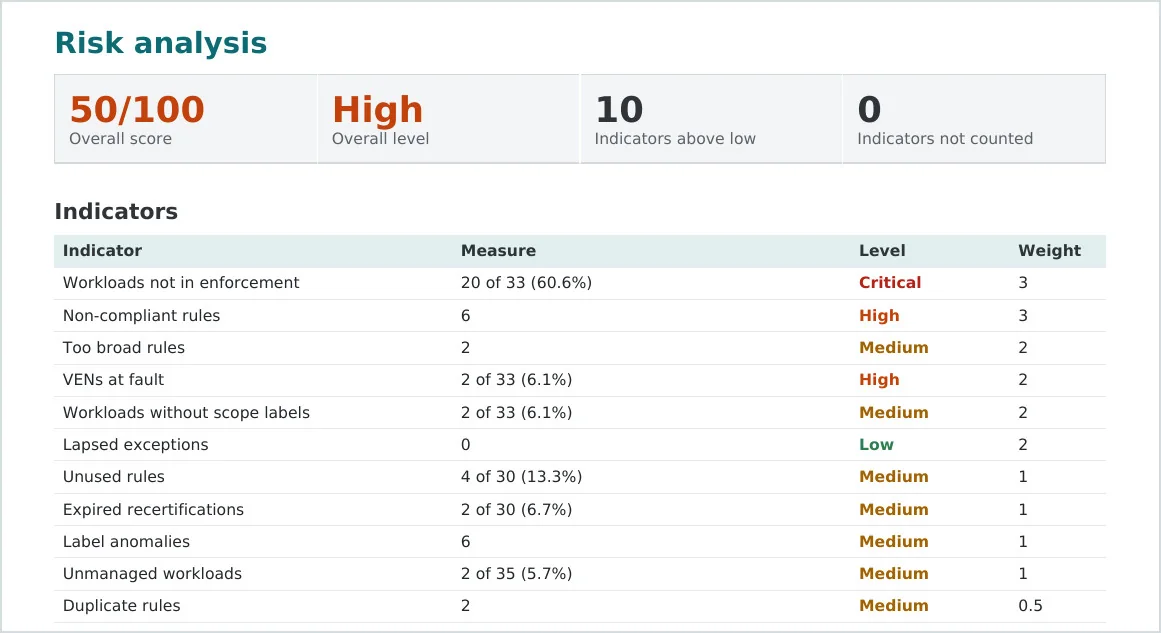
  • A risk score out of 100, calculated from weighted indicators.
  • Ranked recommendations, each with the page where to act.
  • The ten riskiest applications, one by one.
Compliance report: risk score 50/100, level High, weighted indicators
Page 1 of the report on the demonstration instance: 50/100, high risk.

Every action and every call, traced

Two complementary logs, which never contain a secret.

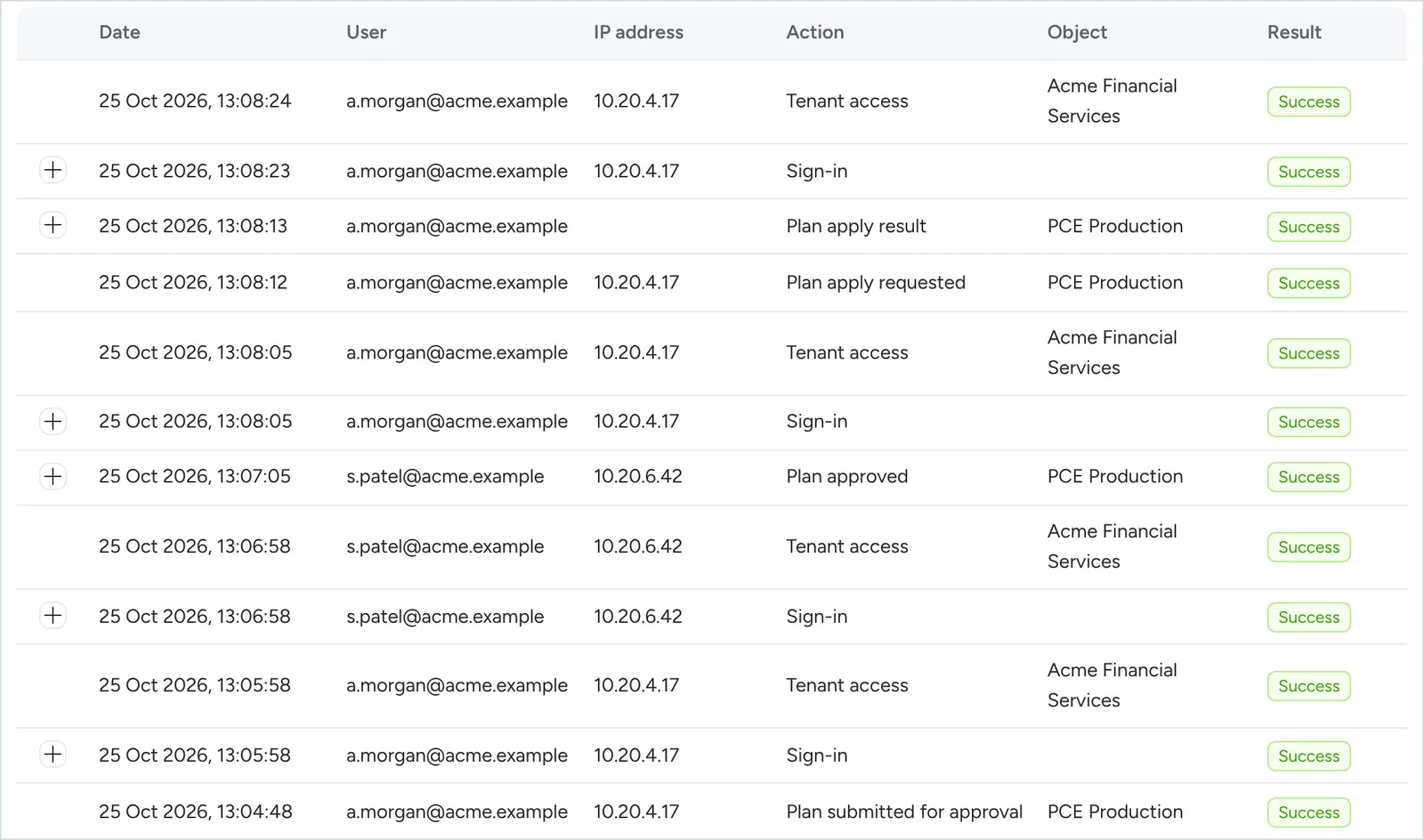
  • Audit log: who, what, when, from which address, with what result; cannot be modified, can be exported.
  • Exchange log: every PCE call, content sent and received, duration, the action behind it.
Audit log: plan submitted by a.morgan, approved by s.patel from another workstation, applied
A plan submitted, approved two minutes later from another workstation, then applied.

* An approach we have not found in the public documentation of Illumio Core, of other microsegmentation solutions or of the tools that manage them (October 2026).

Orchestrate

Changes built, simulated and applied with no surprises

UNIQUE*

IP-by-IP requests, label-based rules

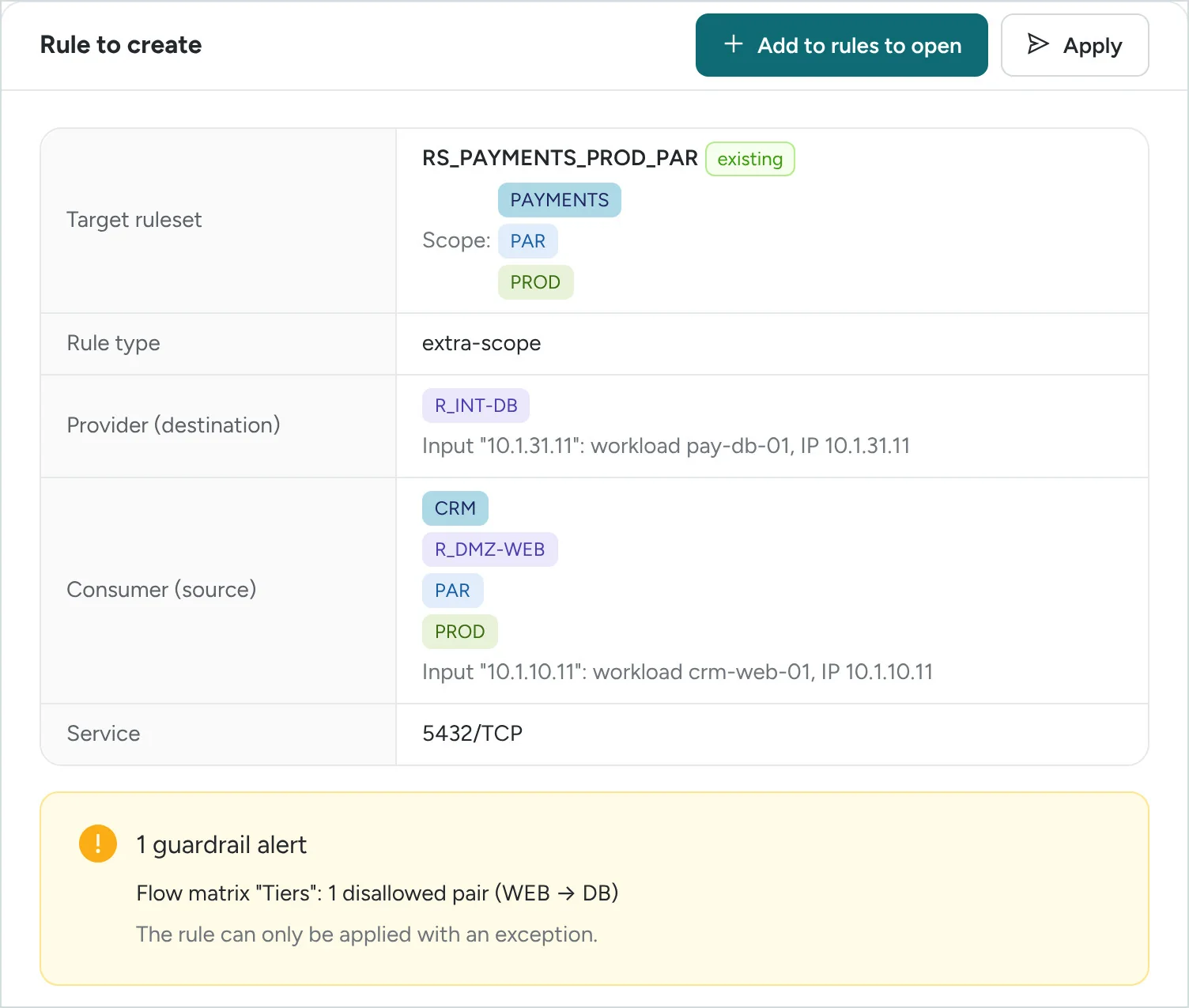
The request stays as it is today: a source, a destination, a port, a protocol, as an IP address or a server name.

  • Each address resolved into a workload and its labels; with no workload, into an IP list.
  • Already open? By which rule, deny rules included?
  • Ruleset and rule type derived from your conventions; checked against your guardrails.
  • A summary to copy into the ticket; the rule joins the rules to open, or is applied through a plan.
Rule to create in RS_PAYMENTS_PROD_PAR, extra-scope, with a guardrail alert
The rule built following your conventions, and what the guardrails say about it.

From ticket to change, with no re-keying

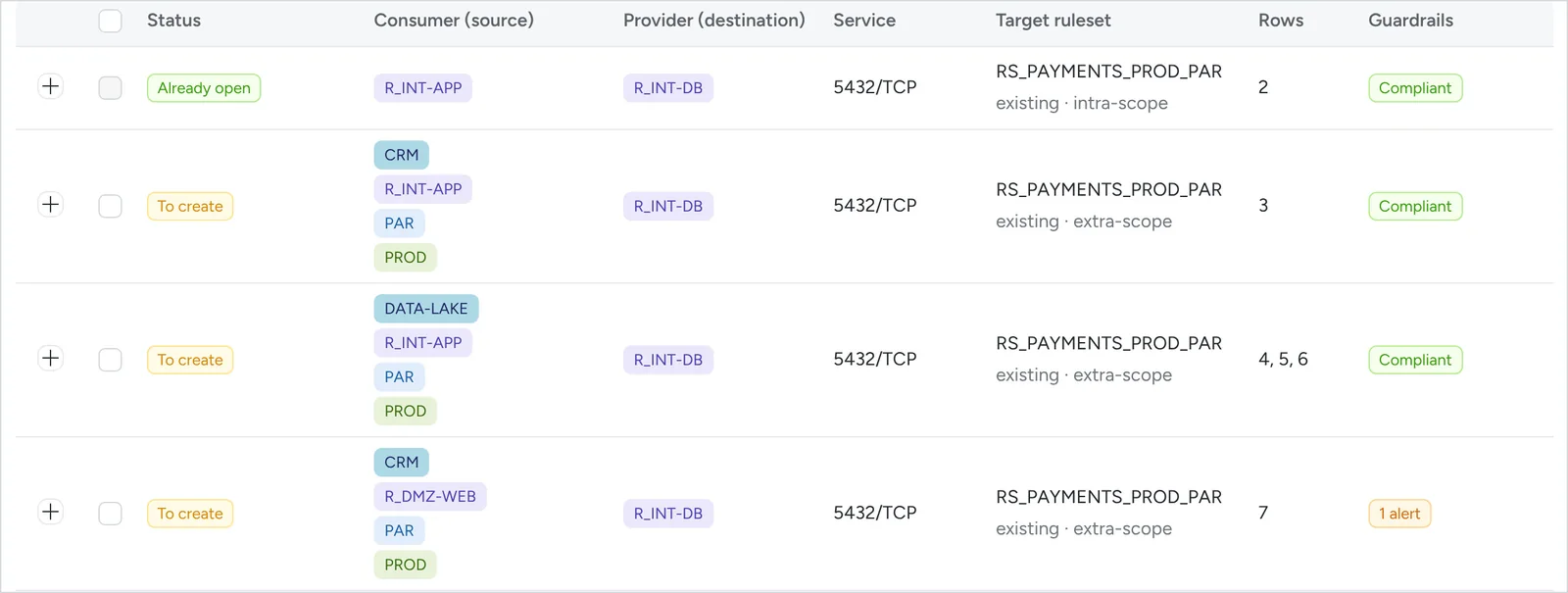
For a project's requests, drop a file: each flow is resolved, checked, then grouped by rule.

  • Check in bulk: up to 100 flows per file.
  • Attach the request: the selected rules and the IP lists to create, in an Excel file that can be re-imported as it is.
  • Apply: a plan whose dry run checks every flow again; a rule already open is not created twice.
Bulk flow check, rule view: one rule already open, three to create, one of them with an alert
One project: ten flows checked at once, grouped into seven rules (extract).

One single path to write: the plan

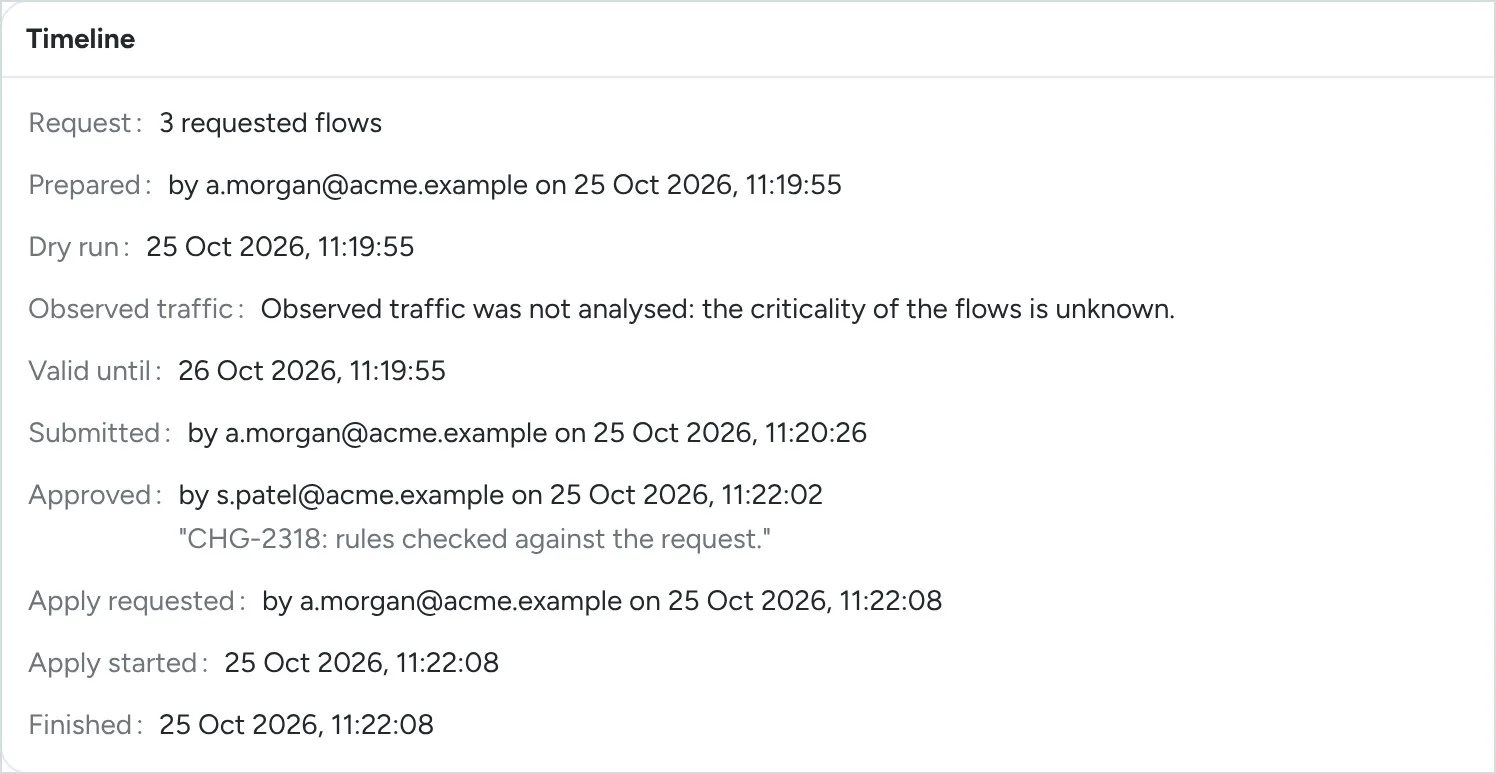
Prepare, dry run, approve, apply, trace: the same path for every change, one at a time or in bulk.

  • Outdated plan: if the PCE's state or the impact has changed, or the validity (24 hours by default) has passed, nothing is written.
  • Stops at the first error: what was waiting for provisioning is undone; the plan says what took effect.
  • No way around it: a change made in the Illumio console shows up at the next synchronisation.
Timeline of a plan: prepared, dry run, submitted, approved by s.patel, applied
How a plan unfolds, as the platform records it.

UNIQUE*

Before writing, you know which flows will be cut

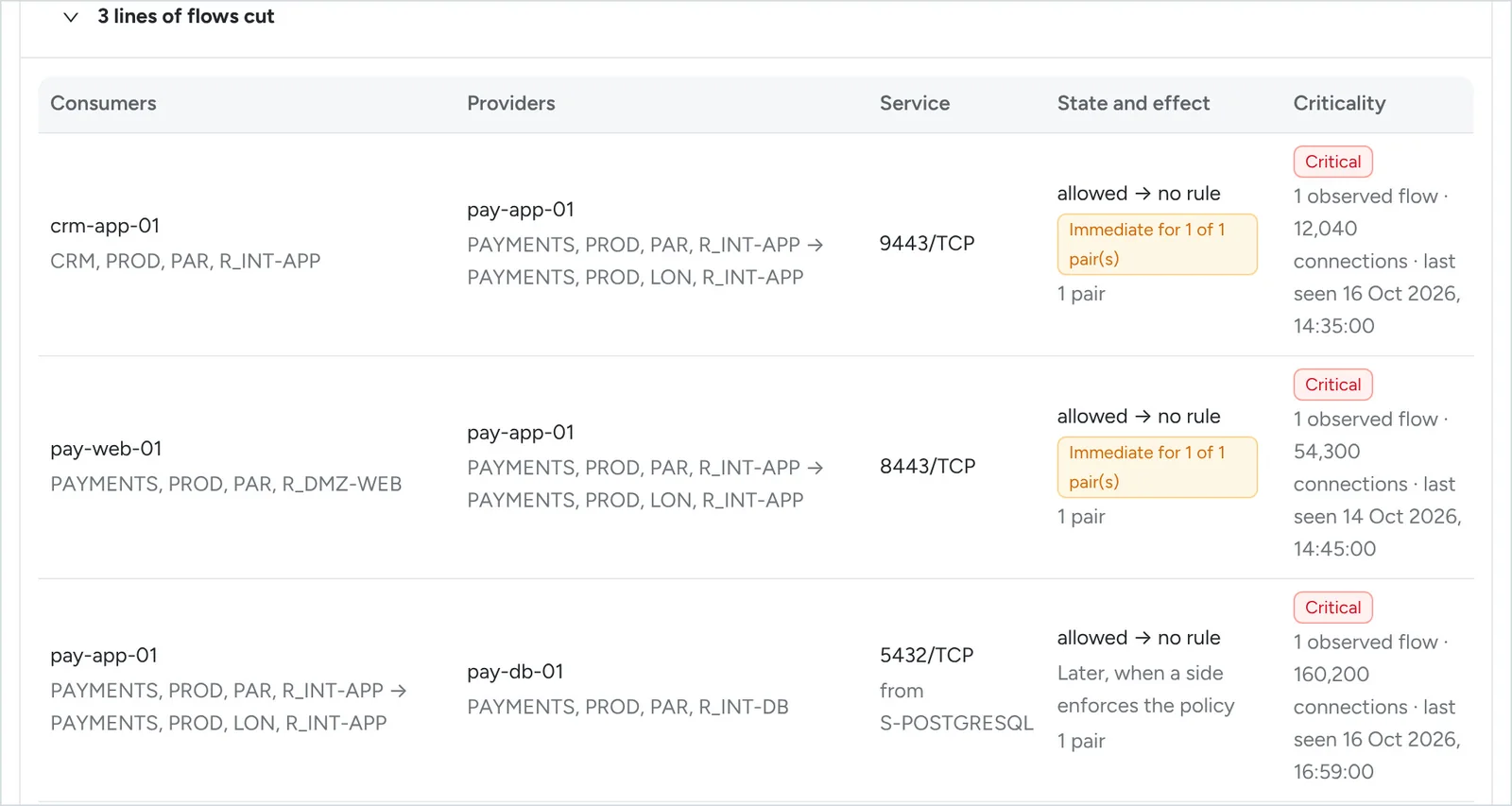
For every plan, Wabba-Sego reads the production policy and calculates the flows cut and opened, immediate effect included.

  • With observed traffic analysis (a plan option): observed flows are critical.
  • On request, proposed rules keep those flows, following your conventions and your guardrails.
  • An impact with immediate effect must be acknowledged; if it changes before writing, the plan is outdated.
Flows cut by the change: critical, immediate effect for two of them
pay-app-01 moves from Paris to London: three flows cut, before anything is written.

Move to enforcement without nasty surprises

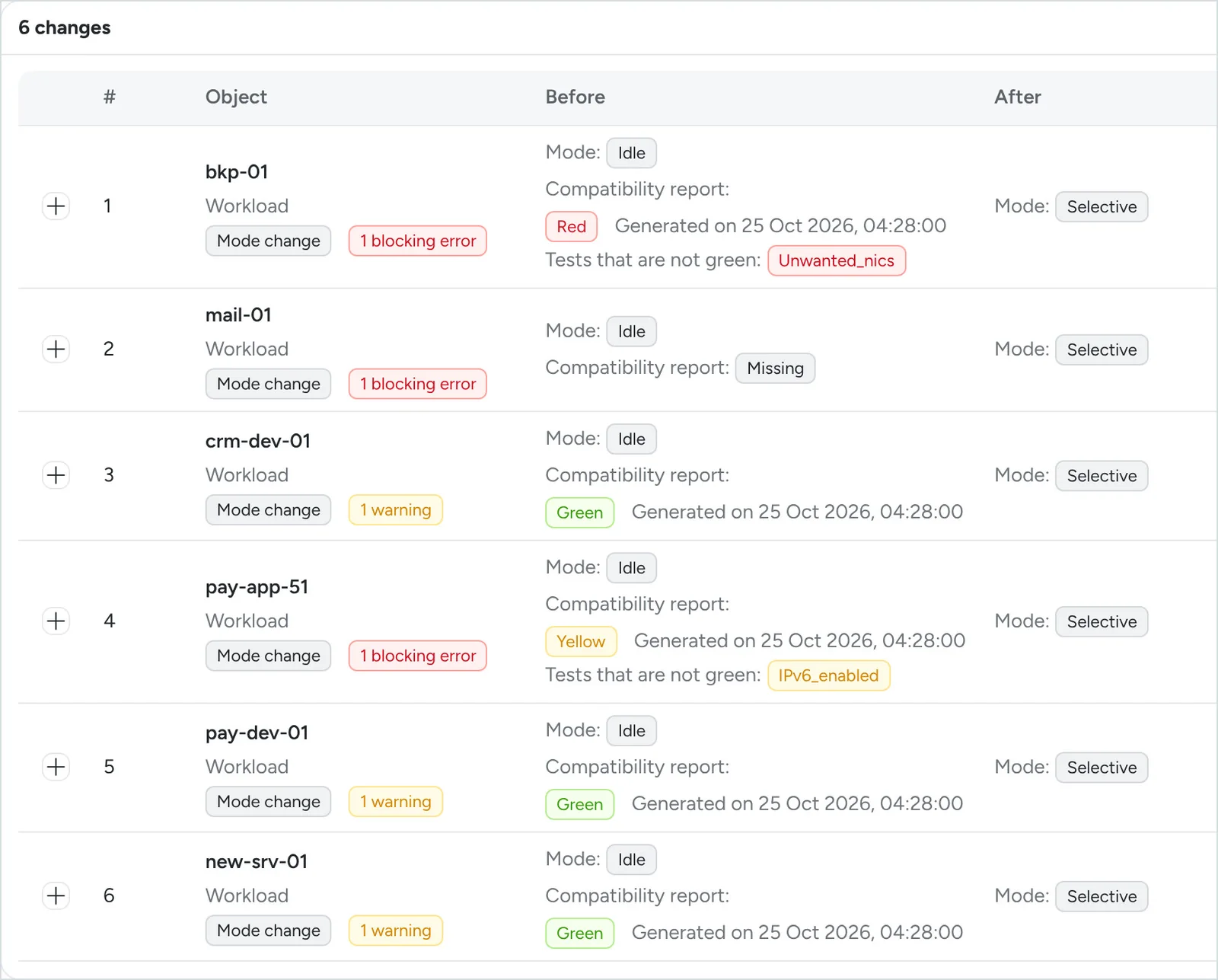
A workload leaves idle mode only with a recent, green compatibility report.

  • Yellow: blocked, unless forced with a reason by a user who holds the right, and logged.
  • Red, missing or too old: blocked.
  • The dry run shows the “potentially blocked” flows of a move to selective or full.
  • A move to full with no allow rule must be acknowledged.
Mode plan: red, missing and yellow reports blocking, green ones allowed
Six workloads from idle to selective: three blocked, each with its reason.

* An approach we have not found in the public documentation of Illumio Core, of other microsegmentation solutions or of the tools that manage them (October 2026).

Maintain

A policy and a fleet kept in shape over time

Whatever breaks your requirements is detected

At every synchronisation, the PCE's labels are compared with the model and the production rules are reviewed.

  • Forbidden combination, prefix or case not followed, label outside the catalogue: Fix anomalies leads to the corrections.
  • Rules that are non-compliant, too broad, unused, duplicated, disabled or under exception.
  • Every deviation leads to its correction: a plan, or an update of the model.
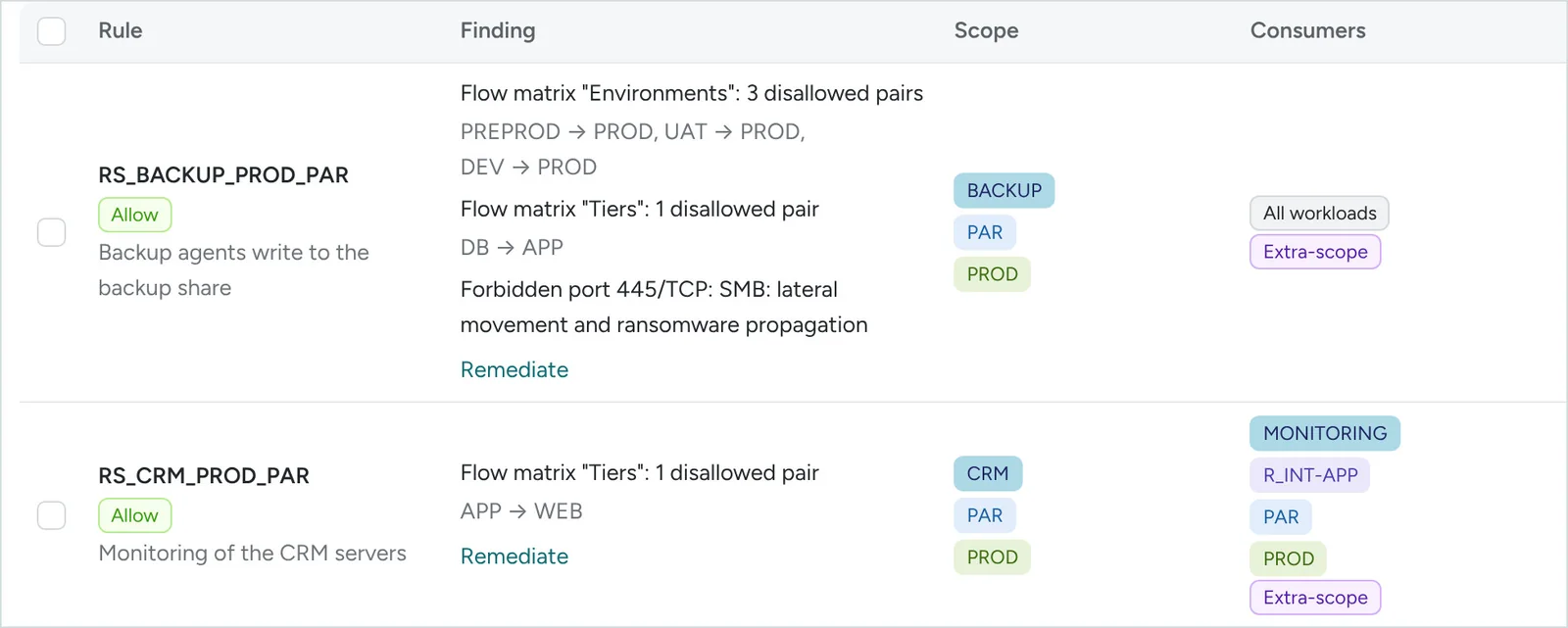
Non-compliant rules, with what they break and the Remediate link
Every non-compliant rule, with what it breaks and a link to its remediation.

UNIQUE*

Fix a non-compliant rule without losing a flow

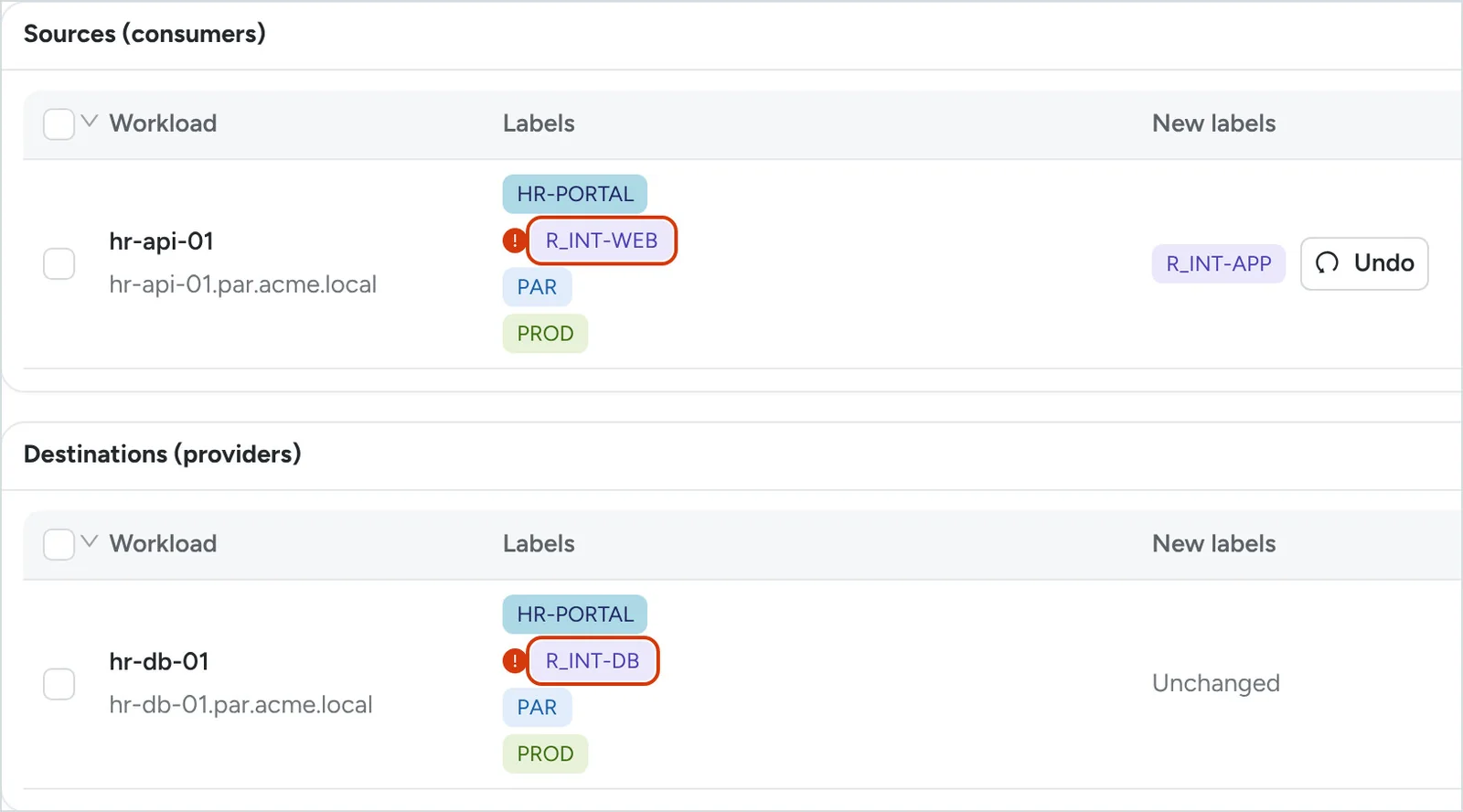
The remediation page shows the rule, what it breaks and the workloads on each side, with the labels at fault circled.

  • Create and enable first: the proposed rule, then its provisioning.
  • Move next: the corrected label; flows go through the new rule.
  • Remove last: the old rule disabled, then provisioned. All in a single plan.
Workloads of the rule: labels at fault circled, new label R_INT-APP for hr-api-01
The label at fault was wrong: hr-api-01 gets R_INT-APP.

UNIQUE*

A granular policy, with no useless rules

The reviews find the rules that no longer serve, even with no traffic.

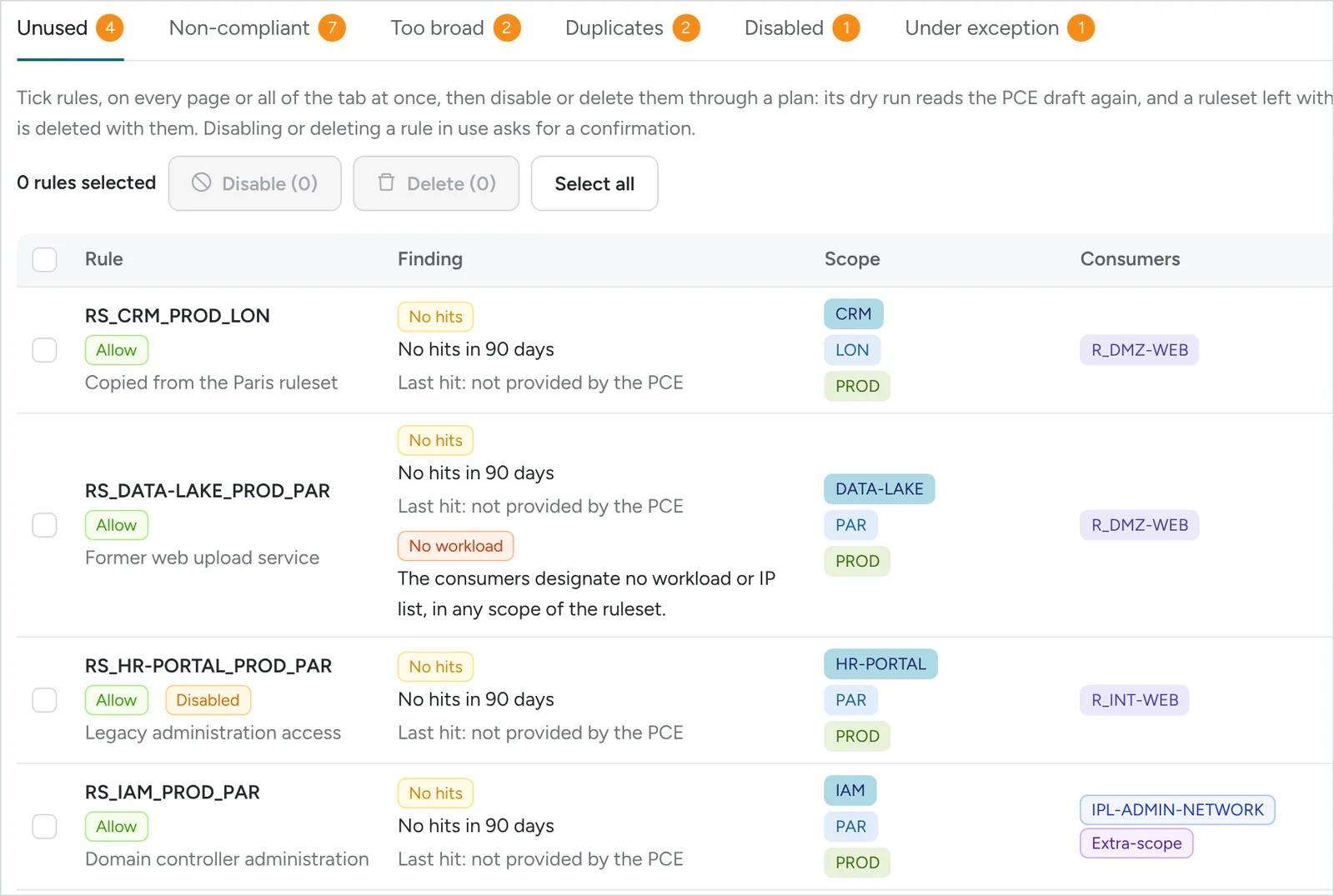
  • No hits in 90 days (by default), per the PCE's Rule Hit Count report.
  • No workload: one side no longer designates any workload or IP list, in any scope of the ruleset.
  • Too broad or duplicated; clean-up through a plan, with a confirmation for a rule still in use.
Unused tab of the rule review: rules with no hits in 90 days, one rule with no workload
Unused rules: no hits, or no workload designated.

Every production rule, reviewed when due

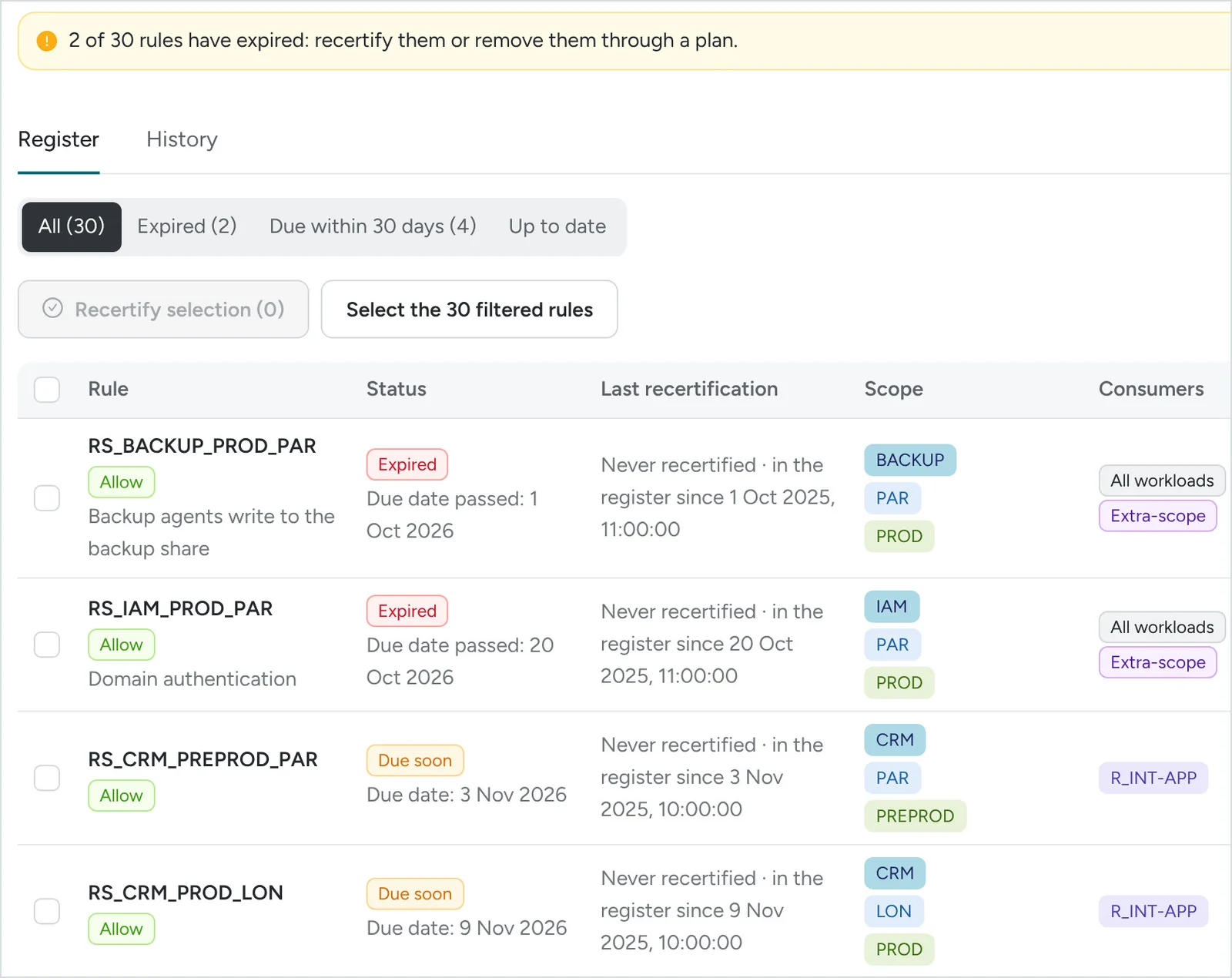
A due date per rule, 12 months by default, reset at every recertification.

  • Recertification one at a time or in bulk, with a comment; history kept and exportable.
  • A rule created in the console gets a due date as soon as it is synchronised.
  • When an exception expires, its rules become expired.
Recertification register: two rules expired, two due soon
The register: two rules expired, two due within 30 days.

The fleet and the PCE under control, every day

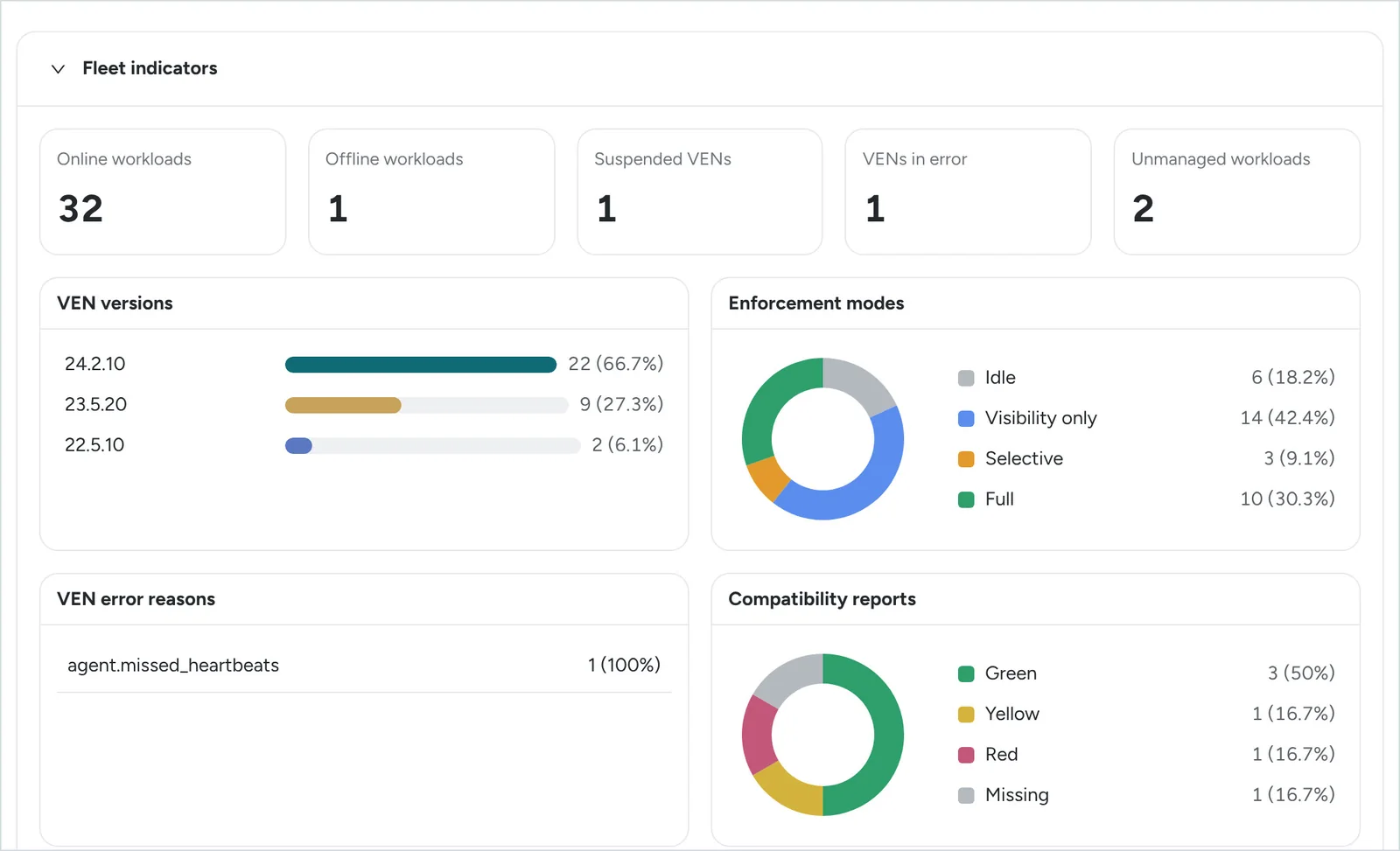
Inventory synchronised every 10 minutes by default, and after every plan.

  • VEN fleet: online workloads, versions, modes, compatibility reports; one click opens the list of servers.
  • PCE health (on premises): nodes, services, alerts, replication.
  • Built-in or custom dashboards, shared, exported as PDF.
Fleet indicators: online workloads, VEN versions, modes, compatibility reports
The VEN fleet at a glance.

* An approach we have not found in the public documentation of Illumio Core, of other microsegmentation solutions or of the tools that manage them (October 2026).

In addition

And every routine operation, in bulk

Export, edit in Excel, re-import: the current state serves as the template. Every row is checked against the model and the guardrails, the impact is calculated, and then it is a plan like any other.

Workloads

  • Labels
  • Modes
  • Applications (shared mode)
  • Container profiles

Policy objects

  • Labels and label groups
  • IP lists
  • Services

Rules

  • Rulesets
  • Rules
  • Deny rules
20,000
workloads per labelling plan
1,000
workloads written per batch
100
flows per flow-check file
24 h
plan validity, by default
Platform

For enterprises and MSSPs, installed on your premises

  • Separate tenants

    Each customer's accounts, instances and data, kept apart.

  • Several PCEs

    Production, pre-production, subsidiaries… in a single tenant.

  • Roles and approval

    Built-in or custom roles; four-eyes approval, optional.

  • English or French

    Interface chosen by each user; reports and files in English.

  • On premises, offline

    Signed bundle; virtual appliance (OVA, VHDX) or Linux containers.

  • Protected access

    Two-factor authentication, rights checked on the server, HTTPS.

  • Encrypted secrets

    PCE credentials encrypted (AES-256-GCM), never displayed or logged.

  • Backups

    Every night and before every update; restore tested with every release.

Prerequisites: Illumio Core, on premises or SaaS; an API key with a global role and no scope (Global Administrator or Owner to write; a read-only key is also possible, plans then being run by hand). PCE health: on-premises PCE. Rules with no hits: Rule Hit Count enabled (PCE 23.5.10 or later on premises, 24.2 or later in SaaS; VEN 23.2.30 or later). Deny rules in rulesets: PCE 24.2 or later. Machine: 2 CPUs and 4 GB of memory at least (4 and 8 GB recommended), 40 GB of disk; no internet access needed.

Licence

A usage-based licence, in work units

Wabba-Sego is licensed in work units (WU): every useful operation that succeeds (computing a plan, checking a flow, a report…) uses the units set in your licence. An operation that fails costs nothing.

Prices and volume of work units are set out in your commercial proposal.

  • Free: synchronisations, consultations, list exports, applying a plan, new dry runs.
  • The balance is carried over from one licence to the next.
  • Transparent: detailed usage by tenant, module and operation stays visible in the platform.
  • Simple renewal: the signed usage statement is uploaded in the customer portal.
Roadmap

What comes next

  1. Priority

    ITSM integration

    ServiceNow first

    • Flow opening requests received from the ServiceNow service catalogue; rules built and checked by Wabba-Sego.
    • Each plan linked to its change request; approval in ServiceNow or in Wabba-Sego.
    • Closure with the plan report.
  2. Next

    Firewalls module

    Governed just like microsegmentation

    • Object model, conventions, guardrails and exceptions.
    • Flow check and opening, impact, plans.
    • Recertification and remediation of non-compliant rules.
  3. Later

    And beyond

    Other devices

    • Other microsegmentation vendors.
    • Proxy and SASE/SSE.
    • Connection to the corporate directory (SSO) and a SaaS offering.

Indicative roadmap, not contractual.

Try Wabba-Sego on your infrastructure

  1. Demonstration

    On your use cases, with your conventions.

  2. 90-day pilot

    Installed on your premises, offline, connected to your PCE: a pilot on a real scope.

  3. Pilot review

    From the labelling model to enforcement: objectives set at the start, measured at the end.